Data Enrichment API: How It Works and How to Choose One
A data enrichment API takes a thin record, maybe just an email or a company domain, and sends back a fuller one: name, title, company size, industry, location, sometimes a phone number. You call it from your code, your CRM, or a workflow tool, usually one record at a time or in small batches.
Most guides stop at "what goes in, what comes out." At ProspectDesk we resolve anonymous website visitors to real people and check them before outreach, and the failures we see almost never start with the output. They start one step earlier, when the API decides which person or company your input actually refers to. Get that wrong and every field after it is confidently wrong.
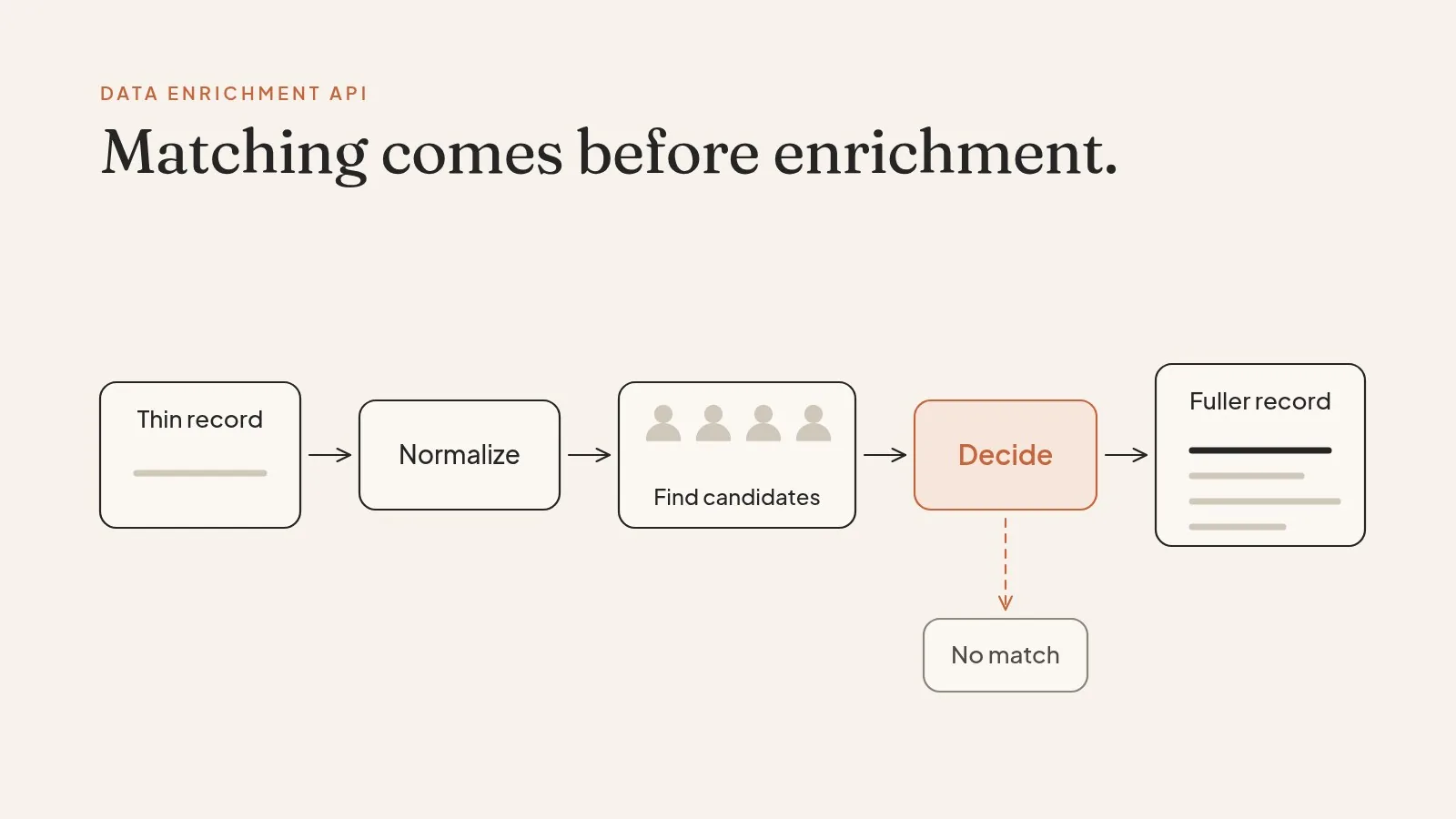
What happens inside one enrichment call
Here's a simple request, in the general shape most vendors use:
curl -X POST https://api.example.com/v1/enrich/person \
  -H "X-API-Key: $KEY" \
  -H "Content-Type: application/json" \
  -d '{"email": "j.ramos@northwind-supply.com"}'
And a response:
{
  "match": true,
  "confidence": 0.91,
  "person": {
    "full_name": "Jordan Ramos",
    "title": "Head of Procurement",
    "linkedin_url": "linkedin.com/in/jordanramos",
    "title_updated": "2026-07"
  },
  "company": {
    "domain": "northwind-supply.com",
    "employees": "201-500",
    "industry": "Wholesale"
  }
}
(Invented example.)
Behind that, three things happened. The API normalized your input, so J.Ramos@Northwind-Supply.com and j.ramos@northwind-supply.com are treated as the same thing. It searched for candidate records that could be this person. Then it picked one and decided whether it was confident enough to return it.
The third step is the one to care about. A confidence value or a match: false response is the vendor being honest about uncertainty. Be wary of an API that always returns something.
DataLayer's docs are a good public example of explicit input rules: to enrich a person you need at least one of an email, a LinkedIn URL, a hashed email, or a first name plus domain, and a no-match comes back as a 404 that isn't billed (DataLayer docs). Rules like that exist because a name alone can't be matched safely.
The three kinds of enrichment API
Enrichment APIs fall into three broad types.
Database lookups check your input against a pre-collected dataset. They're fast and cheap for standard fields. They can't give you a field they never collected, and they're weaker on small private companies.
Research APIs look something up live, like reading a careers page. They're slower and pricier, but they can answer questions no database has a column for.
Waterfall or orchestration tools, like Clay, call several databases in turn until one fills the field. You get higher fill rates. You also inherit the matching rules of every source underneath, and those sources don't agree on who's who.
That last point gets less attention than it should. A waterfall raises fill rate. It can also raise the number of wrong fills, because each extra source is another chance to match a different person with the same name. Ask any waterfall tool how it settles a conflict when two sources disagree.

The inputs that cause most bad matches
When enrichment "isn't working," the cause is usually the input, not the database. Test these cases first.
Shared inboxes. An email like sales@ or info@ belongs to a team, not a person. A careless API matches it to whoever at that company has the richest profile. A careful one returns the company and stops there.
Personal email addresses. A Gmail address can match to a person, but it says nothing about where they work now. Treat any job data that comes back from a personal email as a lead to confirm, not a fact.
Domains that point somewhere else. Companies get acquired, rebrand, and run several domains. An email at an old domain may redirect to the parent, and the API has to decide whether you mean the subsidiary or the parent. Ask how it handles both.
Common names with a company. "Chris Lee at a 10,000-person bank" can be several people. Without a second identifier, the right answer is often a miss.
People between jobs, or with two. Founders, advisors, and part-time consultants often hold more than one current role. Check which one the API returns as primary and whether you can see the others.
Good enrichment APIs let you send more than one identifier per record and use all of them in the match. If you have a LinkedIn URL and an email, send both. Every extra input is one less guess for the matcher.
Fill rate vs. trust
Fill rate is the share of records that came back with a value. It's the number vendors quote and buyers ask for.
It's also the easiest number to inflate. Lower the confidence bar and fill rate goes up. Accept catch-all emails as valid and email fill goes up. Return a company's main switchboard as a "phone" and phone fill goes up.
A better question: of the fields that were filled, how many would you let trigger outreach with no human looking? For most data that's a much smaller number, and it's the one that decides whether a message lands well or embarrasses you.
Practical rule: gate each field on its own. A company domain can go straight through. A title should carry a freshness date. An email should pass a verification check the same day it's used.
Person enrichment vs. company enrichment
Person and company enrichment look alike and fail in different ways.
| Person enrichment | Company enrichment | |
|---|---|---|
| Typical input | Email, LinkedIn URL, name plus company | Domain, company name, LinkedIn company URL |
| Typical output | Title, employer, location, work history | Size, industry, location, funding, sometimes tech stack |
| Most common miss | Wrong person with a similar name | Parent and subsidiary mixed up |
| How fast it goes stale | Every job change | Slower, but acquisitions and rebrands hit hard |
If you need both, enrich the company first and use the result to check the person. A person match whose employer domain disagrees with the company record deserves a second look before anything gets sent.
Handling a miss in code
Whatever vendor you test, write the client so a miss is a first-class result.
import requests

def enrich_company(domain, key):
    r = requests.post(
        "https://api.example.com/v1/enrich/company",
        headers={"X-API-Key": key},
        json={"domain": domain.strip().lower()},
        timeout=10,
    )
    if r.status_code in (404, 204):
        return {"status": "no_match"}
    r.raise_for_status()
    body = r.json()
    if body.get("confidence", 0) < 0.8:
        return {"status": "low_confidence", "raw": body}
    return {"status": "matched", "company": body["company"]}
(Invented endpoint, same shape as the earlier example.) Logging no_match and low_confidence separately is what lets you compare vendors honestly later.
Batch, real time, and the boring details
Enrichment APIs differ a lot in the plumbing, and the plumbing decides how painful your integration is.
Batch size varies. Interzoid accepts up to 100 JSON records per call, or CSV/TSV files of up to 5,000 records (Interzoid). Others cap batches lower or move large requests to an async job you poll.
Retries need care. If a call times out and you retry, you may be billed twice. Some APIs accept an Idempotency-Key header so a retry replays the original response instead of running, and charging, again. Ask every vendor whether it supports one.
Field coverage isn't uniform. Captain Data, for example, states that its enrichment API returns professional and firmographic data and does not return email addresses or phone numbers (Captain Data). That's honest, and it's exactly what to confirm before you build on a vendor.
A few enrichment APIs, by what they actually return
Here are a handful of APIs with public docs, and the detail from each that matters most when you build on it.
| API | Input it takes | Worth knowing |
|---|---|---|
| People Data Labs | Email, LinkedIn URL, name plus company | Bills only successful matches; Pro starts at $98/mo for person data |
| PDL company enrichment | Domain, name, or company profile URL | A separate endpoint from person enrichment |
| Captain Data | LinkedIn URL, name, or domain | Profile and firmographic data; no emails or phones |
| DataLayer | Email, LinkedIn URL, hashed email, or first name plus domain | Separate person and company endpoints; 404 no-matches are free |
| Interzoid | JSON records or CSV/TSV files | Up to 100 records per call, files up to 5,000 records |
None of these is a recommendation. They're here to show how much input rules and output fields vary before you test.
How to choose one
Run a test on your own records and measure these, in this order:
- Match precision. Of 100 records the API matched, how many are the right person or company? Check by hand.
- Miss behavior. When it isn't sure, does it say so, with a confidence score or a clean no-match?
- Freshness. Does each field come with a date, or at least a refresh promise you can hold the vendor to?
- Reachability. What share of returned emails pass an independent verifier today?
- Plumbing. Batch limits, async jobs, retries, rate limits, and how misses are billed.
Fill rate comes last on purpose. A high fill rate on top of weak matching just means more wrong data in your system.
Related reading for the rest of the stack: our guides to the people data API, company data API, and reverse email append.

Enrichment needs a record. Most visitors never leave one.
Every enrichment API needs an input: an email, a domain, a name. Your highest-intent prospects often never give you one. They read your pricing page, compare plans, and leave without filling in a form.
ProspectDesk starts with that anonymous visit. We resolve the visitor to a real person, then run a Know Your Prospect (KYP) check on the result before any outreach goes out. Real: the identity is matched to one specific person, not the nearest profile with a similar name. Reachable: the email is verified deliverable. Ready: there's a current in-market signal behind the outreach. A record that fails any of the three is held back, which is the same discipline this guide asks of a good enrichment API.
Agencies and platforms white-label it and bill it as their own, so their clients get named visitors without buying another tool.
Related guides
- People data API guide — the fields, match rules, and miss behavior of a person lookup.
- B2B data provider guide — how to test a vendor on your own records before you sign.
- Email verification API guide — why a returned email isn't a sendable email, and how to handle catch-alls.
- Technographic data API guide — how tech-stack detection works and where it goes wrong.
Want to see how KYP handles your messiest inputs? Book a call and send the records other vendors got wrong.
FAQ
What is a data enrichment API?
An API that fills in missing fields on a record you already have, such as title, employer, company size, or industry, starting from an identifier like an email, domain, or LinkedIn URL. It isn't a search for new people, and it doesn't send anything.
What's the difference between a lookup, a research API, and a waterfall?
A lookup checks a pre-collected database: fast and cheap for standard fields. A research API looks a fact up live: slower, but it can answer questions no database stores. A waterfall calls several databases in turn to raise fill rate, and inherits every source's matching mistakes.
Does a waterfall fix missing data?
Only if some provider underneath actually has the field. Waterfalling empty sources returns empty and costs more, and each extra source is another chance to match the wrong person.
Why is fill rate a misleading metric?
Because it's easy to inflate: lower the confidence threshold, count catch-all emails as valid, or return a switchboard number as a phone. Judge match precision and miss behavior first, and treat fill rate as the last tiebreaker.
Should I enrich the person or the company first?
The company. Use the company record to sanity-check the person match: if the person's employer domain disagrees with the company record, review it before anything is sent.