Technographic Data API: How It Works and How to Choose
A technographic data API tells you what software a company uses. Send a domain and you get back its stack: CRM, cloud provider, analytics, ecommerce platform, payment tools. Or go the other way: send a technology and get the companies that run it.
Sales and product teams use this to find accounts with a technical fit. If you sell a Salesforce add-on, companies on HubSpot aren't your market. The data looks simple. It isn't, because nobody can see inside a company's systems. Every technographic vendor is making an educated guess from the outside.
At ProspectDesk we spend our days checking whether data about a prospect is real before anyone acts on it, and tech stack fields are some of the most misread data we see. So this guide spends a lot of time on how the guess is made, and how to tell a good one from a bad one.
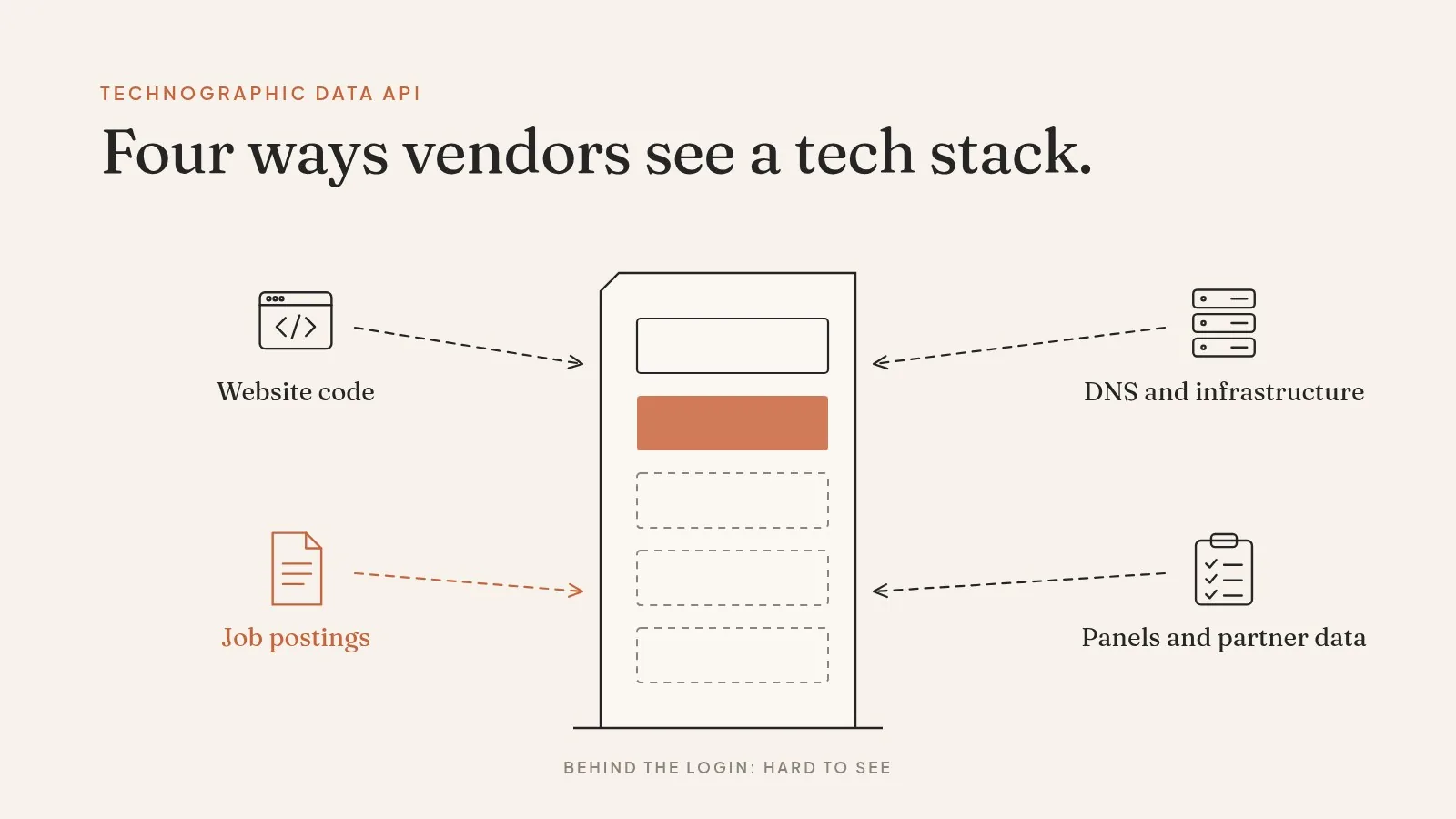
How vendors detect a tech stack
There are four main sources, and each one sees a different part of the company.
Website code. A crawler loads the company's site and looks for traces of tools: a HubSpot tracking script, a Shopify checkout, a Google Tag Manager container. This is accurate for anything that touches the website. It sees nothing behind the login, like an ERP or a data warehouse.
DNS and infrastructure. MX records show which email provider a domain uses. Other records and certificates point to hosting and CDN providers. Reliable, but narrow.
Job postings. If a company is hiring a "Senior Snowflake Engineer," it probably uses Snowflake. This is how vendors see backend and internal tools. TheirStack builds its data from job postings and links every detection back to the original posts (TheirStack). Crustdata combines web signals with job postings (Crustdata).
Panels, surveys, and partner data. Some vendors buy or model data from install bases and surveys. Explorium says its technographics come from multiple data vendors and public records, combined with its own inference models, and are updated quarterly (Explorium docs).
No source covers everything. A vendor that relies only on website code will miss most internal tools. One that relies only on job posts will miss companies that aren't hiring.
What a response looks like
A lookup by domain is usually one call. Here's TheirStack's documented request:
curl -X POST "https://api.theirstack.com/v1/companies/technologies" \
  -H "Authorization: Bearer $KEY" \
  -H "Content-Type: application/json" \
  -d '{"company_domain": "stripe.com"}'
A useful response gives you more than a name per tool. Something like this:
{
  "domain": "northwind-example.com",
  "technologies": [
    {
      "name": "Salesforce",
      "category": "crm",
      "confidence": "high",
      "source": "job_postings",
      "first_seen": "2023-02-10",
      "last_seen": "2026-09-18"
    },
    {
      "name": "Marketo",
      "category": "marketing_automation",
      "confidence": "low",
      "source": "website",
      "first_seen": "2021-05-02",
      "last_seen": "2024-11-30"
    }
  ]
}
(Illustrative response for an invented company.)
Look at the Marketo row. It was last seen nearly two years ago, with low confidence. There's a good chance this company stopped using Marketo. An API that returned "Marketo" with no dates would have you pitching a Marketo integration to a company that already left it.
That's why dates and confidence matter more than catalog size. TechnologyChecker.io stamps every detection with first-seen and last-seen dates and has separate endpoints for adoption, churn, and switches (TechnologyChecker.io). TheirStack uses a three-tier confidence model (low, medium, high) based on mention volume, frequency, location, and recency (TheirStack). These fields are what make the data usable.

Where technographic data goes wrong
These are the misses to watch for.
Stale installs. A script left on an old landing page keeps a tool "detected" long after the contract ended. Always check last-seen.
Agency and subsidiary noise. A marketing agency's site can show every tool its clients use. A parent company's domain can pick up tools from a subsidiary. The domain-to-company match has to be right first.
Trials and pilots. A job post mentioning a tool can reflect a pilot or one team's preference, not a company-wide standard.
Invisible backends. Website crawling can't see an ERP, an internal data stack, or security tools. If those are your target, you need a vendor whose sources include job posts or other off-site signals.
Name collisions. Short or common product names in job posts get mis-tagged. Spot-check any technology with a generic name.
How the leading APIs compare
CUFinder, itself a technographics vendor, published a roundup of eight tech stack APIs in September 2026, describing a test of 300 domains in the same week with 60 checked by hand (CUFinder). That's their test, not ours. Below is a summary of public facts from each vendor's own pages, to start your own shortlist:
| API | Main detection sources (per vendor) | Useful fields | Public note |
|---|---|---|---|
| TheirStack | Job postings | Confidence (low/medium/high), links to source posts, history | Tracks 33,000+ technologies |
| TechnologyChecker.io | Website and domain scanning | First seen, last seen, churn and switch signals | 100 free credits a month; 29 endpoints in 8 groups |
| Crustdata | Web signals and job postings | Technology list, category, source, updated date | REST API, webhooks, and bulk files |
| Explorium | Multiple vendors, public records, inference | Stack grouped by category | Updated quarterly; needs a business ID from its match API first |
| BuiltWith, Wappalyzer | Website code | Current and historical web tech | About $295/mo and from $250/mo, per CUFinder |
Sources: vendor pages linked above; BuiltWith and Wappalyzer prices as reported by CUFinder in September 2026. Check current pricing yourself.
No single vendor covers every source. That's the main thing to take from the table.
Website-based vs. job-based detection
Website-based technographics read a company's site. Job-based technographics read its hiring. The two find different things.
| Website-based | Job-based | |
|---|---|---|
| Sees | Marketing, analytics, ecommerce, front-end tools | Backend, data, internal and security tools |
| Misses | Anything behind a login | Companies that aren't hiring for that tool |
| Freshness | As often as the crawl runs | As often as the company posts jobs |
| Common false positive | Old scripts left on dead pages | Pilots, or one team's preference |
If you can only buy one, pick the one whose blind spot matters least for what you sell.
Tech stack plus intent
Many teams join technographics with intent data, and it makes sense. A company that runs the tool you integrate with is a fit. A company that runs it and is researching your category this month is a priority.
The catch is the join. Tech stack data is keyed by domain, intent is often keyed by company, and contacts are keyed by person. If those three don't resolve to the same entity, you end up writing to someone at the wrong subsidiary about a tool their team never used.
How to choose one
Run a test on your own target accounts, not a vendor's sample. Pick 100 to 200 domains you sell to, including some where you already know the stack from customer calls or your CRM.
Then check these, in order:
- Precision on known accounts. Of the tools reported, how many are really in use?
- Coverage of the categories you care about. If you sell to finance teams, does it see finance software at all?
- Dates. Does every detection come with first-seen and last-seen?
- Confidence and source. Can you see why a tool was detected?
- Domain matching. Does it handle subsidiaries, agencies, and redirected domains?
- Plumbing. Batch size, rate limits, and how credits are charged on a lookup that finds nothing.
On your test domains, count how many detections carry a last-seen date older than 90 days. If a vendor can't give you that date, you can't measure staleness at all, and that tells you most of what you need to know.
Stack data picks the account. KYP picks the person.
Technographics answer one question about a company. They don't tell you who there is paying attention to you, whether that person's email works, or whether now is the moment to reach out.
ProspectDesk answers those. When someone from a target account visits your website, we resolve that anonymous visit to a real person and run a Know Your Prospect (KYP) check before any outreach goes out. Real: the visitor is matched to one specific person. Reachable: their email is verified deliverable. Ready: there's a current in-market signal, so you have a reason to write today rather than someday. Whoever fails is held back.
Put the two together and a stack match stops being a list of logos: you know the company runs the tool you integrate with, and you know which verified person from that company was just on your pricing page. Agencies and platforms white-label the whole check and bill it as their own. For the company side, see our company data API guide; for contact enrichment, the data enrichment API guide.

FAQ
What's the difference between technographic and firmographic data?
Firmographics describe the company itself: size, industry, location, revenue. Technographics describe the software it runs. Most targeting uses both, stored as separate fields on the company record.
Can I find every company that uses a given tool?
Most APIs offer a search by technology. TheirStack's companies/search endpoint and Crustdata's company search both do this. Coverage depends on whether the tool leaves a public trace, on the website or in job posts.
How accurate is technographic data?
It depends on the category. Website tools are detected well. Internal and backend tools are harder, and only show up through job posts or partner data. Test on accounts where you already know the answer, and check last-seen dates.
How often should I refresh tech stack data?
On a schedule, because companies switch tools. Re-pull your target accounts at least as often as the vendor updates its data (Explorium, for example, updates quarterly), and drop detections whose last-seen date has gone stale.
Is there a free option?
Some vendors offer free credits. TechnologyChecker.io lists 100 free credits a month. Expect free tiers to cover single lookups, not bulk search.
A checklist before you sign
- Test on your own 100 to 200 domains, with known answers.
- Ask which sources each detection comes from.
- Require first-seen and last-seen dates on every tool.
- Filter out low-confidence and old detections before they reach your sales workflow.
- Check how the API handles subsidiaries and agency domains.
- Find out whether empty lookups cost credits.
- Re-pull stack data on a schedule, since companies switch tools.
Related guides
- People data API guide — the fields, match rules, and miss behavior of a person lookup.
- B2B data provider guide — how to test a vendor on your own records before you sign.
- Data enrichment API guide — how enrichment matching works and what to check before you pick one.
- Email verification API guide — why a returned email isn't a sendable email, and how to handle catch-alls.
Want to connect your stack targeting to verified people at those accounts? Book a call and bring the accounts where your stack data has been wrong.