Email Verification API: Results, Catch-Alls, and Pricing
An email verification API checks whether an address can receive mail before you send to it. You pass it one address or a list, and it returns a status like valid, invalid, catch-all, or unknown, usually with extra flags for disposable domains and role addresses like sales@. Some vendors call it an email validation API. Same thing.
At ProspectDesk, verification is one of three checks every prospect has to pass before any outreach goes out. Clean yeses and clean nos are easy. This guide is mostly about the results that aren't, because that's where bounces come from.
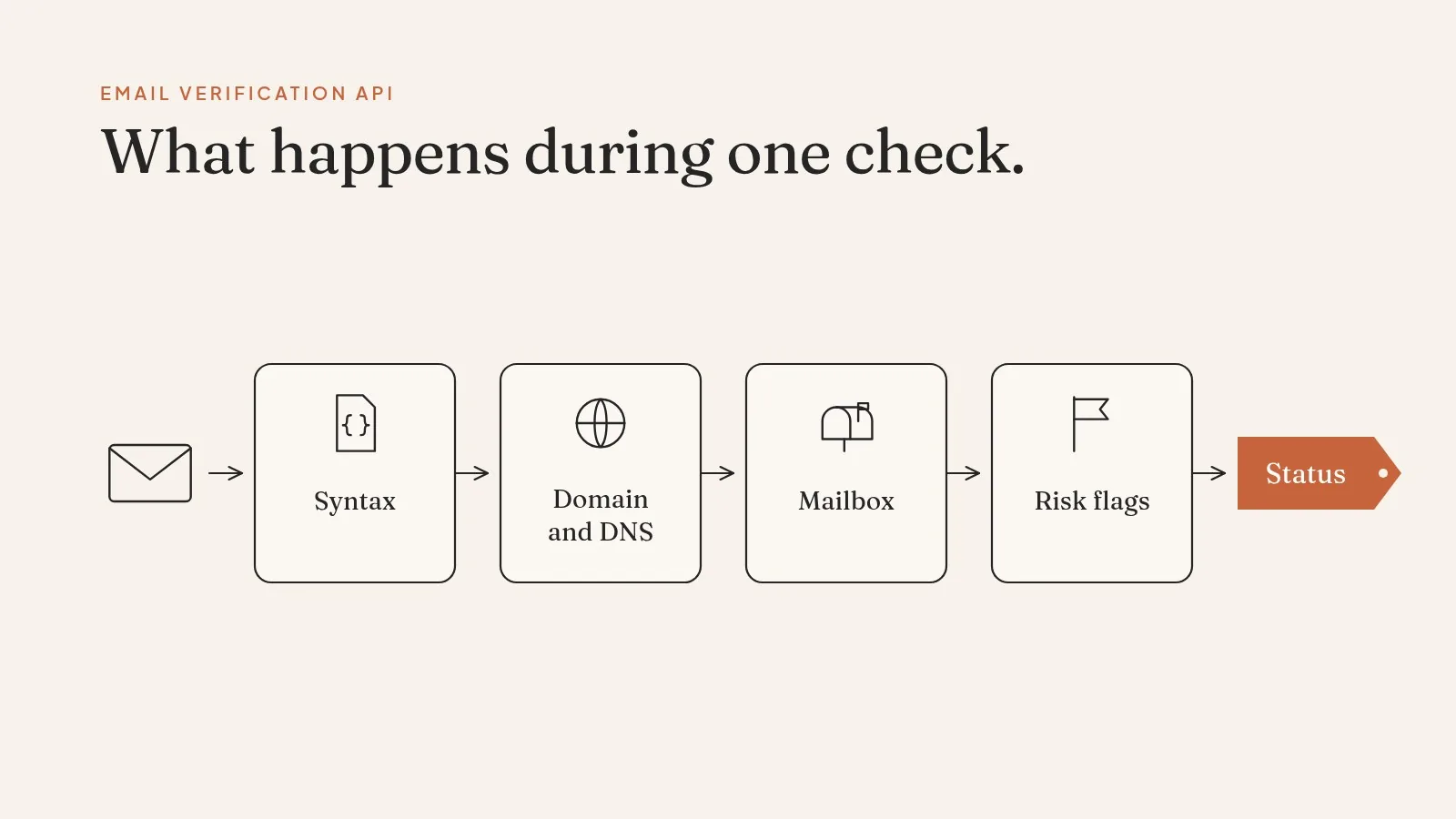
What happens during one check
Most APIs run the same checks, in roughly this order.
- Syntax. Is
jane.doe@acme.comshaped like an email address at all? - Domain and DNS. Does
acme.comexist, and does it have MX records saying where its mail goes? - Mailbox. The API connects to that mail server and asks, without sending anything, whether it would accept mail for this exact address. A
250reply means yes. A550 user unknownmeans no. - Risk flags. Is the domain a known disposable provider? Is the address a role inbox? Is it a free provider like Gmail?
Here's a request with a typical vendor. This is MailValid's documented shape: an X-API-Key header and a POST to a single-verify endpoint (MailValid docs).
curl -X POST https://mailvalid.io/api/v1/verify/single \
  -H "X-API-Key: $KEY" \
  -H "Content-Type: application/json" \
  -d '{"email": "jane.doe@acme-example.com"}'
Response fields differ by vendor, but you'll usually get something like:
{
  "email": "jane.doe@acme-example.com",
  "status": "catch_all",
  "smtp_check": "accepted",
  "is_disposable": false,
  "is_role": false,
  "is_free_provider": false,
  "confidence": 62
}
(Illustrative response, not a real address.)
Not every API runs step 3. SendGrid's validation endpoint, POST /v3/validations/email, returns checks such as has_valid_address_syntax, has_mx_or_a_record, and is_suspected_disposable_address, plus a verdict and score, and it's available only on Email API Pro and Premier accounts (SendGrid reference). Read each vendor's docs closely and find out which checks actually run.
The four results, and the two that cause trouble
Valid and invalid are easy. Send to the first, drop the second.
Catch-all is the hard one. Some company mail servers accept mail for any address at the domain. Ask about jane.doe@, j.doe@, or nobody123@ and the server says yes to all three. From that answer, the API can't tell whether Jane actually has an inbox.
On a business list, this result is common. Published 2026 studies, each drawn from one vendor's own verification data, put it at 18.1% of 655,442 checked B2B addresses (Reachium), 22% of 302,192 mostly B2B validations (HeroBounce), and 31.9% of 4.69 million work-email checks (Scrupp). The spread comes from different lists, but the lesson is the same: expect a meaningful share of any B2B list to come back catch-all.
Some vendors quietly count catch-alls as valid. Their "valid" rate looks great, and your bounce rate tells the truth later. Others mark them catch-all and leave the decision to you. That's more honest, but it means you need a rule.
Unknown means the check didn't finish. The server timed out, greylisted the request, or blocked the verifier. Unknown isn't a verdict, so retry later before you decide anything.
Rules for a product that sends on a user's behalf:
- Valid: pass.
- Invalid: drop, and tell the user why.
- Catch-all: pass only if the address came from a strong source, like a confirmed identity match or the person's own form fill. Otherwise hold it back, or route it to a lower-volume sequence.
- Unknown: retry once after a delay. If it's still unknown, treat it like catch-all.
- Disposable: drop.
- Role address: depends on the use. Fine for a support inbox. Usually wrong for a one-to-one sales email.

Why a "valid" result still bounces
A verification is a snapshot. People leave jobs, and IT removes their mailboxes. An address that was valid in March can bounce in June. Re-verify anything older than your normal send window, and always re-verify a list you bought or exported a while ago.
Mail servers also shade the truth. Some accept the check and reject the real message later. Some rate-limit verifiers and return soft errors. A good API is open about this and gives you a confidence score instead of pretending every answer is certain.
And verification only answers "does this inbox exist." It doesn't tell you the inbox belongs to the person you think it does. If the address came from a guessed pattern, like firstname.lastname@, a valid result can still reach the wrong person. That's an identity problem, which is why we never run verification on its own. More on identity in our people data API guide.
Real time vs. bulk
Most vendors offer two ways in.
Real-time checks verify one address per call, at the moment it enters your system: a signup form, a CRM sync, a lead coming out of an enrichment step. Keep the timeout short. A slow mail server shouldn't block your user's form.
Bulk jobs take a list and process it in the background. MailValid, for example, accepts up to 10,000 addresses per bulk request and can call a webhook when the job finishes (MailValid docs). Use bulk to clean a list before a campaign, and real time for anything a person is waiting on.
What a team needs from either is predictable: steady volume without surprise throttles, real docs, and structured fields like status, confidence, and source, so automation can reject a row before it reaches the CRM. Add one more requirement: the same result model on the real-time and bulk endpoints, so you aren't maintaining two sets of rules.
How a few verification APIs compare
Here's what each vendor's own page says. These are vendor statements, not our test results.
| API | What its page says | Worth checking |
|---|---|---|
| Kickbox | Single and bulk verification; unknown results aren't billed (the credit is refunded) | How catch-alls are reported within its "risky" result |
| Abstract | Four checks in one call, with a free tier | Whether the free tier includes the mailbox check |
| Twilio SendGrid | Validation sold alongside its email API | Only on Email API Pro and Premier accounts, per its reference docs |
| MailValid | Single and bulk endpoints, webhook on bulk completion; unknown results use 0 credits | Bulk limit of 10,000 per request |
Prices and plans change often, so confirm them on the vendor's page before you build a cost model.
Verifying an address vs. confirming a signup
Some pages on this topic cover a different job: confirming that the person who typed an address into a signup form owns it, usually with a link sent by email. The two get mixed up.
A verification API answers "can this address receive mail." A confirmation link answers "does this person control this inbox." If users sign up with their own email, you want both: the API at the form to catch typos and fakes, the link to prove ownership. If you're checking addresses for people who haven't contacted you, like prospects in a sales tool, only the API applies.
How pricing works, and the hidden costs
Almost every email verification API sells credits, one per address checked. The differences hide in the details.
Price per check varies widely. An October 2026 comparison from Sealch, itself a verification vendor, lists 10,000 pay-as-you-go checks at $39 on MillionVerifier and $129 on ZeroBounce (Sealch). Treat any vendor's own comparison with care, and check current prices yourself.
Catch-all handling can cost extra. DeBounce's optional catch-all validation uses 10 additional credits per address, on top of the 1-credit standard check (DeBounce help center). On a B2B list with a large catch-all share, that can multiply your bill.
Unknowns may or may not be billed. Kickbox and MailValid say they don't charge for unknown results. Some vendors don't say. Ask.
Credits may expire. A cheap pack that expires in 12 months costs more than it looks if your volume is uneven.
The number to compare is cost per address you can actually send to, not cost per check.

Where verification fits in a product
If you're building anything that sends on someone's behalf, verification belongs in two places. Check when an address enters your system, so bad data never gets stored as good. Check again right before a send if the address is more than a few weeks old.
That second check is the one teams skip, and it's where bounces come from. It matters more than it used to, because mailbox providers have grown stricter with senders whose bounce rates creep up.
Reachable is one of three questions
A verified address tells you the inbox exists. It doesn't tell you who's behind it, or whether this is a good moment to write. That's why ProspectDesk treats verification as one step in a Know Your Prospect (KYP) check that runs before any outreach goes out:
- Real: the address belongs to a specific, resolved person, not a pattern guess.
- Reachable: the address is verified deliverable, with catch-alls and unknowns held back rather than passed as valid.
- Ready: there's a current in-market signal, so the message has a reason to arrive now.
The people we check usually start as anonymous visitors to a partner's website. We resolve them to real people first, then run KYP, so verification never runs on an address with no person behind it. Partners white-label the result and bill it as their own. Related guides: email append and reverse email append.
A checklist before you pick a vendor
- Confirm which checks actually run. Is there a live mailbox check, or just syntax and DNS?
- Ask how catch-alls are reported and whether they count as valid.
- Find out whether unknowns are billed.
- Test 500 addresses you already know the answer to, including some that bounced.
- Check the timeout and rate limits on the real-time endpoint.
- Make sure the real-time and bulk endpoints return the same fields.
- Price it per sendable address, not per credit.
- Set a re-verification window and stick to it.
Related guides
- People data API guide — the fields, match rules, and miss behavior of a person lookup.
- B2B data provider guide — how to test a vendor on your own records before you sign.
- Data enrichment API guide — how enrichment matching works and what to check before you pick one.
- Technographic data API guide — how tech-stack detection works and where it goes wrong.
Want to see how KYP treats your catch-alls and unknowns? Book a call and bring the addresses that bounced last month.
FAQ
What is an email verification API?
An API that checks whether an email address can receive mail without sending anything to it. It returns a status, usually valid, invalid, catch-all, or unknown, plus flags for disposable, role, and free-provider addresses.
What does a catch-all result mean?
The domain's mail server accepts mail for any address, so the API can't confirm that this specific mailbox exists. Don't treat it as valid. Send to it only when the address came from a strong source, and expect it to make up a real share of a B2B list.
Does "valid" mean I can send?
It means the mailbox accepted the check at that moment. It doesn't confirm the inbox belongs to the person you think it does, and it doesn't cover consent or the purpose of your message. Re-verify anything older than your send window.
What should I do with "unknown" results?
Retry once after a delay; the server may have timed out or greylisted the check. If it's still unknown, handle it like a catch-all. Store it as unknown, never as valid.
How much does an email verification API cost?
Most vendors sell credits, one per address checked. An October 2026 comparison listed 10,000 checks at $39 on MillionVerifier and $129 on ZeroBounce. Watch for extra charges on catch-all validation, billed unknowns, and expiring credits, and compare cost per sendable address.